BoxShadow
New in version 2.2.0.
BoxShadow is a graphical instruction used to add a shadow effect to an element.
Its behavior is similar to the concept of a CSS3 box-shadow.

The BoxShadow declaration must occur inside a Canvas statement. It works
similarly to other graphical instructions such as Rectangle,
RoundedRectangle, etc.
Example:
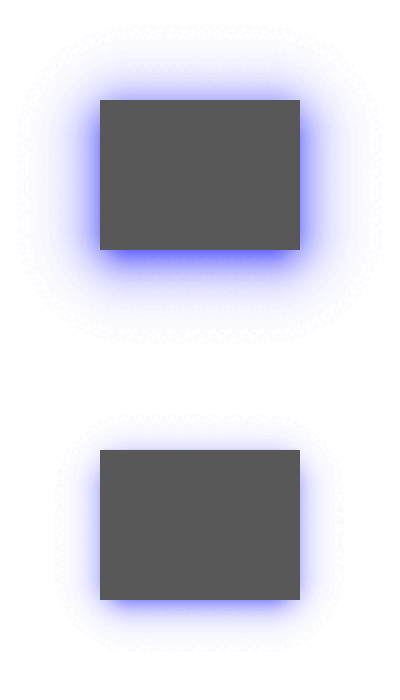 <MyWidget>: Button: pos_hint: {"center_x": 0.5, "center_y": 0.5} size_hint: None, None size: 200, 150 background_down: self.background_normal canvas.before: Color: rgba: 0, 0, 1, 0.85 BoxShadow: pos: self.pos size: self.size offset: 0, -10 spread_radius: -20 border_radius: 10, 10, 10, 10 blur_radius: 80 if self.state == "normal" else 50
<MyWidget>:
    Button:
        pos_hint: {"center_x": 0.5, "center_y": 0.5}
        size_hint: None, None
        size: 200, 150
        background_down: self.background_normal
        canvas.before:
            Color:
                rgba: 0, 0, 1, 0.85
            BoxShadow:
                pos: self.pos
                size: self.size
                offset: 0, -10
                spread_radius: -20
                border_radius: 10, 10, 10, 10
                blur_radius: 80 if self.state == "normal" else 50
- class kivy.graphics.boxshadow.BoxShadow(*args, **kwargs)
Bases:
kivy.graphics.fbo.FboNew in version 2.2.0.
- Parameters:
- size: list | tuple, defaults to
(100.0, 100.0). Define the raw size of the shadow, that is, you should not take into account changes in the value of
blur_radiusandspread_radiusproperties when setting this parameter.- pos: list | tuple, defaults to
(0.0, 0.0). Define the raw position of the shadow, that is, you should not take into account changes in the value of the
offsetproperty when setting this parameter.- offset: list | tuple, defaults to
(0.0, 0.0). Specifies shadow offsets in (horizontal, vertical) format. Positive values for the offset indicate that the shadow should move to the right and/or top. The negative ones indicate that the shadow should move to the left and/or down.
- blur_radius: float, defaults to
5.0. Define the shadow blur radius. Controls shadow expansion and softness.
- spread_radius: float, defaults to
0.0. Define the decrease/expansion of the shadow’s raw
size.- border_radius: list | tuple, defaults to
(0.0, 0.0, 0.0, 0.0). Specifies the radii used for the rounded corners clockwise: top-left, top-right, bottom-right, bottom-left.
- size: list | tuple, defaults to
- blur_radius
Define the shadow blur radius. Controls shadow expansion and softness.
Defaults to
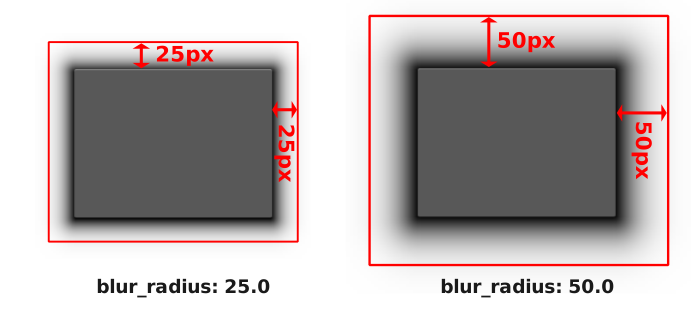
5.0.In the image below, the start and end positions of the shadow blur effect length are indicated. The transition between color and transparency is seamless, and although the shadow appears to end before the red rectangle, its edge is made to be as smooth as possible.
Note
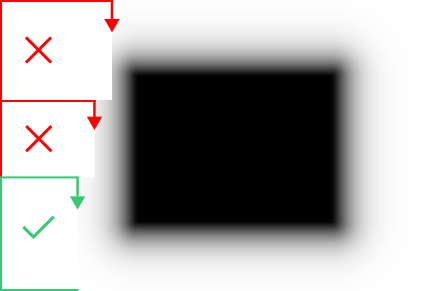
In some cases (if this is not your intention), placing an element above the shadow (before the blur radius ends) will result in a unwanted cropping/overlay behavior rather than continuity, breaking the shadow’s soft ending, as shown in the image below.
- border_radius
Specifies the radii used for the rounded corners clockwise: top-left, top-right, bottom-right, bottom-left.
Defaults to
(0.0, 0.0, 0.0, 0.0).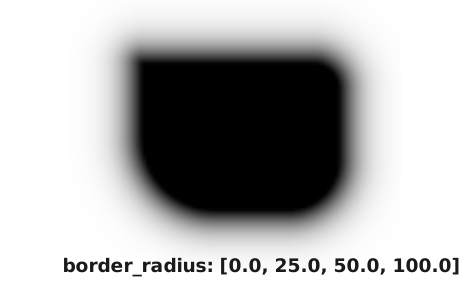
- offset
Specifies shadow offsets in [horizontal, vertical] format. Positive values for the offset indicate that the shadow should move to the right and/or top. The negative ones indicate that the shadow should move to the left and/or down.
Defaults to
(0.0, 0.0).For this property to work as expected, it is indicated that the value of
poscoincides with the position of the target element of the shadow, as in the example below: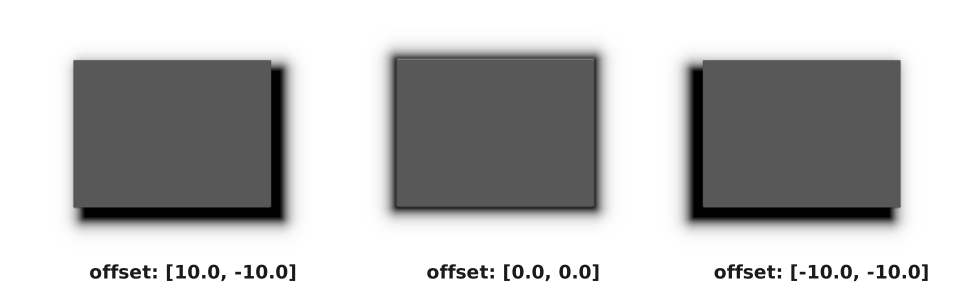
- pos
Define the raw position of the shadow, that is, you should not take into account changes in the value of the
offsetproperty when setting this property.Returns the adjusted position of the shadow according to the adjusted
sizeof the shadow andoffsetproperty.Defaults to
(0.0, 0.0).Note
It is recommended that this property matches the raw position of the shadow target element. To manipulate horizontal and vertical offset, use
offsetinstead.
- size
Define the raw size of the shadow, that is, you should not take into account changes in the value of
blur_radiusandspread_radiusproperties.Returns the adjusted size of the shadow according to the
blur_radiusandspread_radiusproperties.Defaults to
(100.0, 100.0).Note
It is recommended that this property matches the raw size of the shadow target element. To manipulate the decrease/expansion of the shadow’s raw
size, usespread_radiusinstead.
- spread_radius
Define the decrease/expansion of the shadow’s inner size.
Defaults to
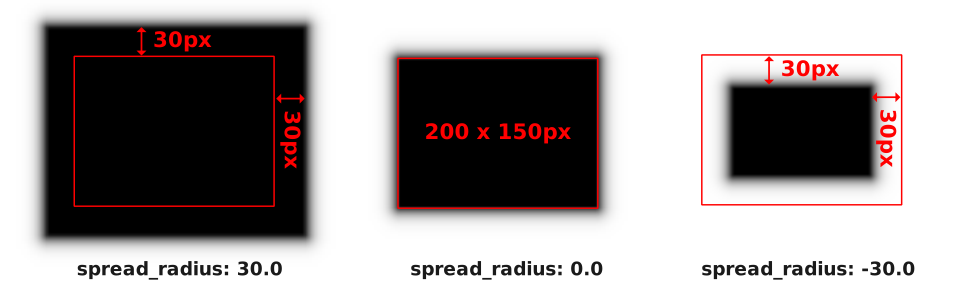
0.0.In the image below, the target element has a raw size of
200 x 150px. Positive changes to thespread_radiusvalue will cause the rawsizeof the shadow to increase in both horizontal and vertical directions, while negative values will cause the shadow to decrease.This property is especially useful for cases where you want to achieve a softer shadow around the element, by setting a negative value for
spread_radiusand a larger value forblur_radiusas in the example.